电脑长时间使用难免会遇到各种故障问题,其中电脑黑屏、蓝屏的情况最为常见,最近有用户反映使用时遇到了电脑蓝屏提示system thread exception not handled,这是怎么回事呢?就此,本篇带来了详细的解决方法,分享给大家,一起看看吧。  系统之家win10 21h2 2006最新镜像(纯净免激活) [电脑系统] 系统之家win10专业版以win10 21h2 2006最新镜像为基础,包含了2022年最新累积更新,通过精心优化制作,加入了Windows必须的运行库的组件,万能驱动程序,系统运行游戏大型应用稳定可靠。解决了之前版本的bug问题,安装后无需激活,系统无捆绑,欢迎体验。
电脑蓝屏system thread exception not handled什么意思?
答:system thread exception not handled蓝屏通常是驱动冲突、虚拟内存配置错误之类的软故障。
不兼容的硬软件、驱动或更新补丁导致系统文件受损。
解决方法:
解决方法一:
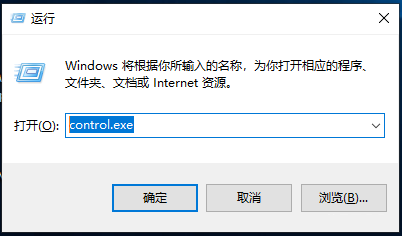
1、使用 Windows键+R打开运行,输入“control.exe”,点击确定,如下图:
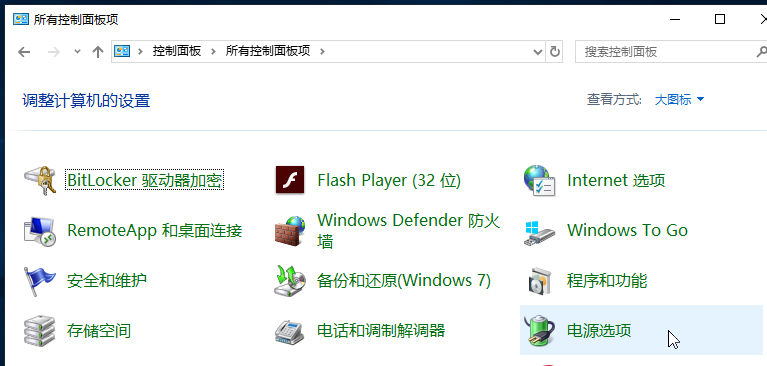
2、选择“电源选项”,如下图:
3、点击“选择电源按钮的功能”,如下图:

4、点击“更改当前不可用的设置”,如下图:

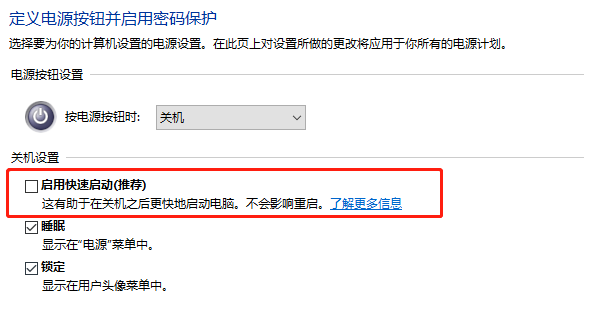
5、取消对关机设置中“启用快速启动(推荐)”的勾选,保存修改后退出控制面板。
解决方法二:
1、重启电脑按F8进入安全模式或者PE。
2、打开我的电脑,左上方点【查看】,勾选【隐藏的项目】。
3、删除WdFilter.sys文件在C:\Windows\System32\drivers\wd和C:\ProgramData\Microsoft\WindowsDefender\Platform\4.18.2003.4-0\Drivers中找到WdFilter.sys,然后将其删除。
4、重启电脑即可。
解决方法三:
1、卸载最近更新的驱动、Windows更新补丁,卸载最近新装程序。
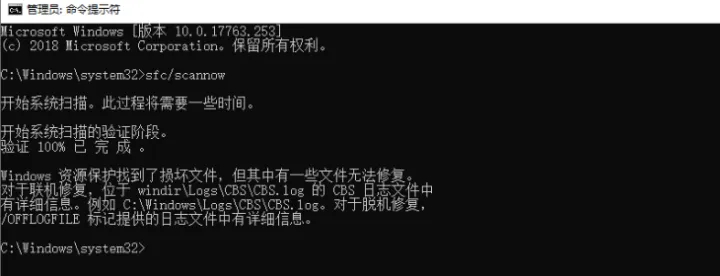
2、以管理权限运行命令提示符,输入sfc/scannow后回车等待检验修复系统文件。
3、移除新装外设、硬盘等。